
ABSTRACT
This report details the design and implementation of a fully functional, real-time Tetris game on the TM4C123 (EduARMv4) platform. The project heavily emphasizes embedded systems principles, combining a Tiva C Series microcontroller with a BOOSTXL Kentec 3.2″ SPI display, a 4×4 matrix keypad, and a 2-pin passive buzzer. The system features a hybrid dual-input architecture that intelligently prioritizes hardware keypad interrupts over resistive touchscreen ADC inputs. A non-blocking game loop ensures strict 100 FPS real-time performance, while state-machine-driven logic handles rendering, collision detection, and PWM-simulated audio generation without halting core game mechanics.
I.INTRODUCTION
Embedded systems development demands a delicate balance between computational efficiency and rigorous hardware management. This project explores these core principles through the design and implementation of a fully functional, real-time Tetris game on the TM4C123 microcontroller, utilizing the EduARMv4 trainer platform. While high-level game development typically relies on sophisticated operating systems and dedicated graphics processing units, rendering a dynamic, fast-paced game on a resource-constrained ARM Cortex-M4 architecture introduces unique engineering challenges.
The primary objective was to architect a system capable of strict real-time performance—specifically, maintaining a deterministic 100 FPS non-blocking game loop—without relying on an underlying operating system. Achieving this required precise, low-level control over the microcontroller’s hardware resources. This included implementing advanced GPIO multiplexing to handle a 4×4 matrix keypad and a passive buzzer simultaneously, alongside developing ADC-driven interrupt service routines (ISRs) for the resistive touchscreen. Furthermore, meticulous optimization of SPI bus bandwidth was critical to prevent visual latency and screen flickering during rapid display updates.
To overcome these constraints, the entire development stack was written in the C language. The software architecture heavily leverages the TivaWare Peripheral Driver Library for hardware abstraction and relies on the Graphics Library (GrLib) for rendering primitive shapes and UI elements to the SPI-driven Kentec 3.2″ LCD. By integrating a priority-based hybrid input system, custom PWM-simulated audio generation, and a robust finite state machine, this project demonstrates how foundational embedded software techniques can be synthesized to create a highly responsive and complex interactive application.
II.HARDWARE ARCHITECTURE
The physical foundation of this project is built upon the EduARMv4 trainer board, which serves as a breakout and interfacing platform for the primary microcontroller and its peripheral modules[cite: 1]. The architecture is designed to manage high-speed display updates, prioritize hardware interrupts, and drive external actuators simultaneously without signal degradation.
2.1 Microcontroller Unit
The core of the system is the Texas Instruments Tiva C Series TM4C123GH6PM microcontroller[cite: 1]. Built around a 32-bit ARM Cortex-M4F architecture, it features a dedicated Floating-Point Unit (FPU) and is configured to operate at a system clock frequency of 50 MHz, derived from the main oscillator via an internal Phase-Locked Loop (PLL)[cite: 1]. This clock speed provides the necessary computational bandwidth to maintain the strict 10 ms game loop processing budget required for real-time performance[cite: 1].
2.2 Display Interface
Visual output is handled by a BOOSTXL Kentec 3.2-inch TFT LCD module, driven by an onboard SSD2119 controller[cite: 1]. The display interfaces with the MCU via a high-speed Serial Peripheral Interface (SPI) bus[cite: 1]. To manage the data overhead required for real-time 100 FPS rendering, the GPIO pins dedicated to the SPI bus are heavily optimized. Specific control lines, such as the chip-select (CS) pin on Port B (PB5), are strictly managed by the graphics library to ensure stable frame updates without flickering or bus contention[cite: 1].
2.3 Dual Input Subsystem
The system employs a multi-modal input architecture to capture player commands with minimal latency:
• Matrix Keypad: A 4×4 tactile matrix keypad serves as the primary hardware control inter- face[cite: 1]. To prevent electrical shorts during simultaneous multi-key presses, the interfacing GPIOs are carefully multiplexed[cite: 1]. The row pins (Port E: PE0–PE3) are configured as open-drain outputs, while the column pins (Port C: PC4–PC7) are configured as inputs with internal pull-up resistors enabled[cite: 1].
• Resistive Touchscreen: Integrated directly into the Kentec display overlay, a resistive touch- screen provides an alternative graphical input method[cite: 1]. It is driven by an Analog-to-Digital Converter (ADC) Interrupt Service Routine (ISR) that continuously samples and captures X/Y coordinate data[cite: 1].
2.4 Audio Actuation
A 2-pin passive buzzer is utilized to generate in-game acoustic feedback, including startup fanfares, line clear alerts, and game-over sequences[cite: 1]. Unlike active buzzers, this passive component requires a continuous toggling signal to generate specific frequencies[cite: 1]. It is directly driven by GPIO Port E, Pin 5 (PE5)[cite: 1]. To ensure maximum acoustic volume and clarity, PE5 is explicitly configured for an 8 mA drive strength in standard push-pull mode, deliberately differentiating it from the open-drain configuration of the adjacent keypad pins on the same port[cite: 1]. Tonal frequencies are generated via precise, software-simulated Pulse Width Modulation (PWM) using timing delay functions[cite: 1].
III.EMBEDDED SOFTWARE DESIGN
3.1 Matrix Keypad Scanning
The keypad is interfaced using standard GPIO polling. Port E pins are configured as open-drain outputs to drive the rows, while Port C pins are configured as inputs with internal pull-up resistors to read the columns. Sequential scanning prevents short circuits and successfully resolves specific key codes assigned to piece movement, rotation, and hard drops.
3.2 Resistive Touchscreen Logic
The touch interface utilizes an ADC Interrupt Service Routine (ISR) triggered by the X/Y coordinates of the screen. To filter out mechanical noise and false triggers, two mechanisms were implemented:
- ADC Guard: A 2-frame stabilization (20ms) requirement is enforced before a touch is registered as valid.
- Touch Margin: A 4-pixel dead-zone is programmed inside the on-screen grid cells to prevent “cross-talk” between adjacent virtual buttons.
A unified input handler prioritizes the matrix keypad over the touchscreen, ensuring that tactile inputs take precedence and latency is minimized during intense gameplay.
3.3 Audio Generation
Because the MCU does not use a dedicated DAC for the 2-pin passive buzzer, audio is generated manually by toggling a GPIO pin. The buzzer is driven by SysCtlDelay functions to create square waves at specific frequencies.
Crucially, the hardware configuration for the buzzer (Port E, Pin 5) is set to a Push-Pull configuration with an 8mA drive strength to maximize acoustic volume, which is distinct from the open-drain configuration used for the keypad rows on the same port. The system features unique frequencies for distinct sound events: Game Start (Fanfare), Line Clear (Double-beep), and Game Over (Descending fall).
IV.GAME ENGINE AND REAL TIME PERFORMANCE
4.1 state machine architecture
The software architecture is governed by a finite state machine (FSM) that dictates the flow of the application:
- STATE_MENU: Renders the high-detail logo array and waits for the start signal via keypad or touch.
- STATE_PLAYING: Executes the active game loop, manages score tracking, applies piece gravity, and handles input.
- STATE_PAUSED: Halts piece gravity while preserving the current board array in memory.
- STATE_GAMEOVER: Triggers the final audio cue, displays the final score, and offers a reset option.
4.2 Real time performance constraints
The system operates on a non-blocking loop maintaining a fixed rate of 100 Frames Per Second (10ms/frame). Piece “gravity” (downward movement) is decoupled from the main loop rendering using a modulo operator against the frameCount and a dynamic speed variable. This ensures the user interface and input handlers remain highly responsive even when the active piece is falling slowly.
To optimize the SPI bus and prevent screen flickering, the engine uses Partial Redrawing. Instead of clearing and redrawing the entire 320×240 display every frame, the system only erases and redraws moving pieces and active score updates, significantly reducing SPI bus congestion.
4.3 Core logic mechanics
- Collision Detection: Implemented using a bitmask-based The active 4×4 shape matrix is continuously compared against the 14×20 game board array using X and Y offsets before any spatial transformation is allowed.
- Randomization (7-Bag System): To mimic modern standard Tetris rules, the engine utilizes a ShuffleBag() This ensures players receive one of every seven pieces before encountering a repeat, preventing “bad luck” streaks.
- The “Ghost” Piece: The engine pre-calculates the final landing position of the current piece by running a virtual, invisible collision loop downwards.
- Dynamic Levelling: Difficulty automatically increases every 10 cleared lines by systematically reducing the gravity delay.
V.SYSTEM INTEGRATION AND FINAL PRODUCT
The final phase of the project involved integrating the software engine with the physical EduARMv4 hardware setup, verifying all peripheral interfaces operated synchronously without blocking the 100 FPS game loop constraint.
5.1 hardware assembly
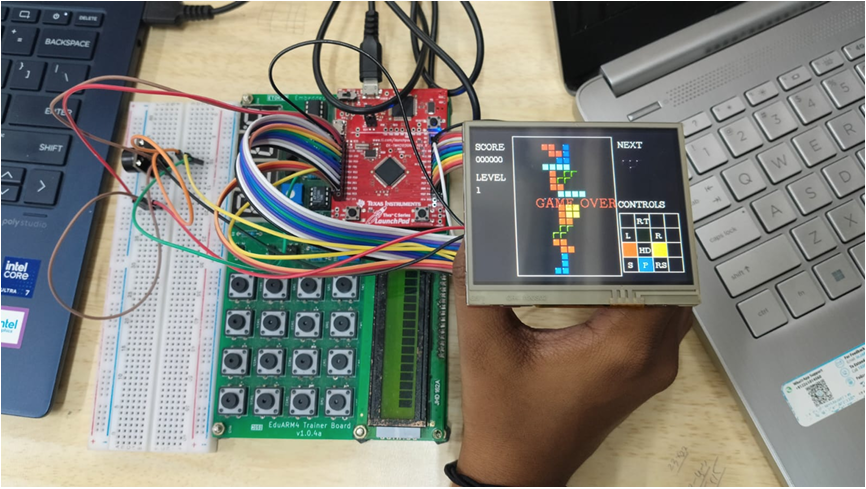
Figure 1: Final hardware assembly showing the EduARMv4 board, Tiva C MCU, 4×4 Keypad, and buzzer wiring
5.2 Game Interface and Display Output
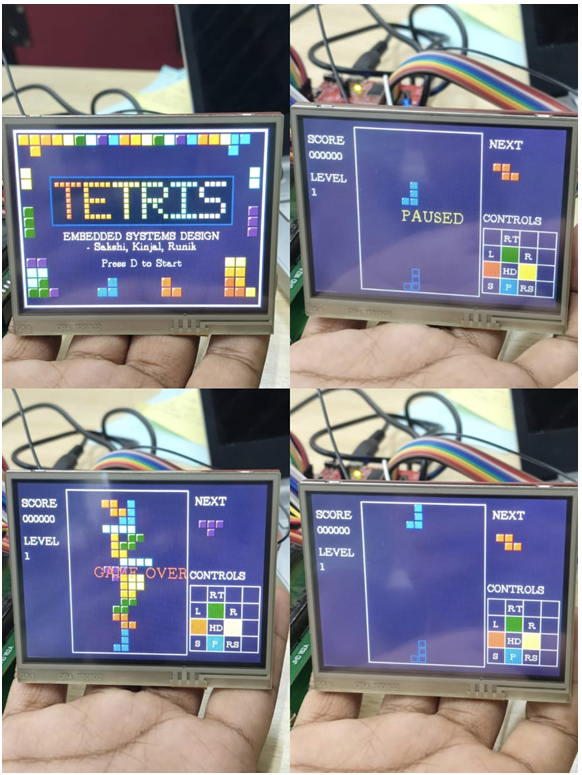
Figure 2: The Tetris game actively running on the BOOSTXL Kentec 3.2″ SPI display, illustrating the rendered grid, next piece preview, and score UI
VI.CONCLUSION
The Real-Time Tetris project successfully demonstrates the deployment of a complex, state-driven application on the Tiva C microcontroller. By carefully balancing GPIO drive strengths, handling ADC interrupts for touch polling, prioritizing hardware inputs, and optimizing SPI graphics via partial redrawing, the system achieves a stable 100 FPS. The project effectively bridges software algorithmic logic with low-level embedded hardware constraints.
Recent Comments