ABSTRACT
Modern real-time systems increasingly demand both high computational performance and strict latency constraints, especially in applica- tions such as embedded vision, robotics, autonomous systems, and edge intelligence. To meet these requirements, system designers rely on heterogeneous architectures that combine CPUs for control and scheduling with GPUs for parallel computation. However, simply offload- ing computation to a GPU does not guarantee low latency or real-time behavior. In practice, performance and responsiveness are strongly influenced by how software interacts with the underlying hardware.
The motivation behind this mini-project is to understand the internal working of CPU–GPU systems and to study how programming models such as CUDA expose hardware behavior through concepts like streams, asynchronous execution, memory transfers, and synchronization. Without this understanding, applications often suffer from hidden overheads due to kernel launch latency, inefficient memory usage, excessive synchronization, and poor coordination between CPU and GPU tasks, leading to unpredictable delays in real-time pipelines.
This project is driven by the need to design systems where latency, overlap, and resource utilization can be reasoned about explicitly rather than treated as black-box behavior. By studying the execution flow of CUDA programs and the interaction between host-side scheduling and device-side computation, the project aims to build an intuition for writing efficient and latency-aware GPU programs. Such understanding is essential for designing reliable real-time systems, where hardware capabilities and software structure must be carefully aligned to meet timing requirements.
Through this exploration, the project emphasizes the importance of hardware–software co-design as a foundational skill for developing low-latency systems on modern heterogeneous platforms.
I.OBJECTIVE
The primary objectives of this mini-project are as follows:
- To understand the internal architecture of modern GPUs and the execution model exposed through
- To study CPU–GPU interaction mechanisms, including memory transfers, kernel execution, and
- To analyze how CUDA streams and asynchronous execution can be leveraged to improve pipeline
- To implement an object detection pipeline using GPU acceleration and evaluate its execution
- To explore model ensembling techniques where multiple inference models with different execution characteristics are combined to improve detection performance [1].
II.OVERVIEW OF GPU HARDWARE ARCHITECTURE
GPUs are massively parallel processors designed to execute tens of thousands of lightweight threads concurrently. Unlike CPUs, which are optimized for low-latency sequential execution, GPUs prioritize high-throughput parallel computation. This architectural difference makes GPUs ideally suited for deep learning, computer vision, scientific simulations, and high-performance numerical workloads. [2]
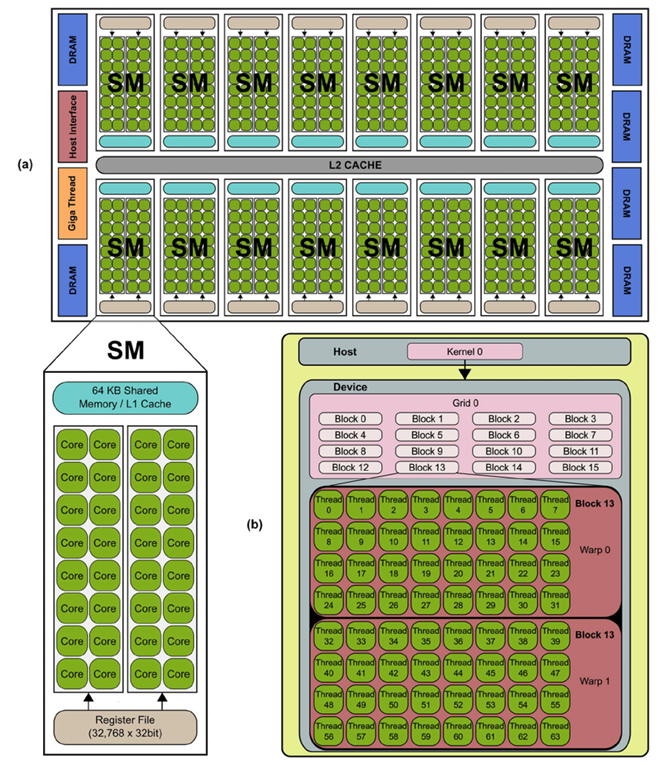
Figure 1: Generalized NVIDIA GPU Architecture showing SMs, memory hierarchy, warp schedulers and copy engines
III.OVERVIEW OF GPU ARCHITECTURE AND EXECUTION MODEL
Modern Graphics Processing Units (GPUs) are designed as highly parallel, throughput-oriented processors capable of executing thousands of lightweight threads concurrently. Unlike CPUs, which are optimized for low-latency execution of a few complex threads, GPUs focus on maximizing overall throughput by exploiting massive data-level parallelism. This section presents an overview of the GPU architecture and explains how CUDA programs are executed on the hardware.
3.1 High-Level GPU Architecture
A GPU consists of multiple Streaming Multiprocessors (SMs) connected to off-chip global memory (DRAM) through a shared L2 cache and memory controllers. Each SM acts as an independent execution unit capable of scheduling and executing many threads in parallel.
The major architectural components of a GPU include:
- Streaming Multiprocessors (SMs): The primary compute units responsible for executing
- L2 Cache: A cache shared across all SMs that reduces access latency to global
- Global Memory (DRAM): Large-capacity but high-latency memory accessible by all
- Memory Interconnect and Controllers: Manage data movement between SMs and
This organization allows multiple SMs to operate concurrently while sharing access to memory resources.
3.2 Streaming Multiprocessor (SM) Organization
Each SM contains both computation and memory resources required to execute threads efficiently. The key components within an SM are:
- CUDA Cores: Arithmetic logic units (ALUs) that execute integer and floating-point
- Register File: Fast on-chip storage that holds private variables for each
- Shared Memory / L1 Cache: Low-latency memory shared among threads within the same
- Warp Schedulers: Hardware units that select and issue instructions from ready
The SM is designed to hide long memory access latencies by rapidly switching between multiple active warps.
3.3 CUDA Execution Hierarchy
CUDA exposes the GPU’s parallelism using a hierarchical programming model:
- Grid: Represents a single kernel launch and consists of multiple thread
- Block: A group of threads that execute on the same SM and can cooperate using shared memory and
- Thread: The smallest execution unit, responsible for executing the kernel
Each thread block is scheduled independently, enabling scalable execution across different GPU sizes.
3.4 Warp-Based Execution Model
Although threads are programmed individually, the GPU executes them in groups called warps. A warp consists of 32 threads that execute the same instruction simultaneously in a Single-Instruction Multiple-Thread (SIMT) fashion.
Key characteristics of warp execution include:
- All threads in a warp share a common program
- Divergent control flow within a warp leads to serialized
- Memory accesses by threads in a warp are combined into fewer transactions when properly Understanding warp behavior is essential for writing efficient CUDA programs.[2]
3.5 Kernel Execution Flow
The execution of a CUDA kernel proceeds through the following steps:
- Kernel Launch: The CPU launches a kernel asynchronously to the
- Block Scheduling: Thread blocks are assigned to available SMs based on resource
- Warp Formation: Threads within a block are grouped into
- Instruction Execution: Warp schedulers issue instructions from ready warps each
- Memory Access: Data is accessed through registers, shared memory, caches, or global
- Completion: The kernel finishes once all blocks have completed
The GPU achieves high throughput by keeping many warps active so that computation can continue while other warps wait for memory operations.
3.6 GPU Memory Hierarchy
The GPU memory hierarchy is designed to balance capacity and access latency:
- Registers: Fastest memory, private to each
- Shared Memory: Low-latency memory shared within a
- L1 Cache: Caches global memory accesses at the SM
- L2 Cache: Shared cache across all
- Global Memory (DRAM): High-latency, high-capacity
Efficient CUDA programs minimize global memory accesses and maximize data reuse in shared memory and registers.
3.7 CPU–GPU Interaction
The CPU is responsible for launching kernels, managing memory, and coordinating execution, while the GPU performs parallel computation. Kernel launches and memory transfers introduce overheads that significantly influence end-to-end latency.
Since kernel launches are asynchronous, proper synchronization is required when results are needed on the CPU. Inefficient coordination between CPU and GPU can lead to increased latency, even if GPU computation itself is fast.
IV.CUDA PROGRAMMING MODEL
CUDA (Compute Unified Device Architecture) is a proprietary parallel computing platform developed by NVIDIA that enables programmers to execute general-purpose computations on GPUs. CUDA provides extensions to standard programming languages such as C and C++ to express parallelism explicitly.[2]
A CUDA program follows a well-defined execution flow. The CPU allocates memory on both the host and the device, transfers data from host to device, launches one or more kernels for execution on the GPU, retrieves the results back to the host, and finally releases allocated resources. Kernel execution is asynchronous with respect to the CPU, allowing computation and data transfer to overlap when properly structured.
The CUDA programming model exposes hardware behavior such as concurrency, memory hierarchy, and synchronization, making it possible to design applications that closely align with the underlying GPU architecture.
V.CUDA STREAMS AND CONCURRENCY
CUDA streams provide a programming abstraction that enables concurrent execution of GPU operations such as memory trans- fers and kernel launches. A stream is defined as an ordered sequence of operations that execute on the GPU in the order they are issued. While operations within a single stream are serialized, operations issued to different streams may execute concurrently, subject to hardware and resource constraints.
The primary motivation for using streams is to improve overall pipeline efficiency by overlapping communication and computation, thereby reducing idle time on both the CPU and GPU.[3, 4].
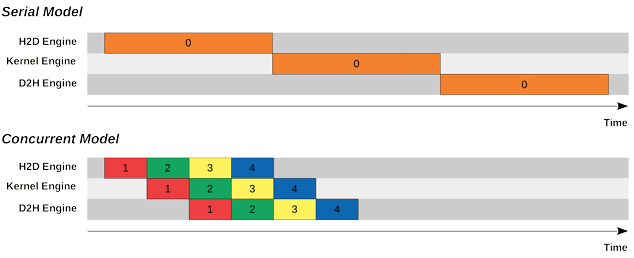
Figure 2: Serial and Concurrent Model differences based on kernel and copy engines
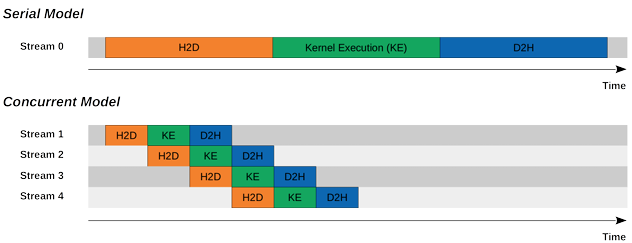
Figure 3: Overlapping of independent streams to demonstrate concurrency (Hiding Latency)
5.1 Default Stream and Serial Execution Model
By default, all CUDA operations are issued to a single implicit stream, commonly referred to as Stream 0. In this default execution model, memory transfers and kernel executions are strictly serialized. A typical execution sequence involves transferring data from the host to the device (H2D), executing the kernel, and then transferring the results back from the device to the host (D2H).
In this serial model, each stage must complete before the next begins. As a result, the GPU compute units remain idle during memory transfers, and the memory engines remain idle during kernel execution. Although this model is simple to implement, it leads to poor hardware utilization and increased end-to-end latency, especially in real-time or streaming applications.
5.2 Concurrent Execution Model Using Multiple Streams
CUDA streams allow developers to issue independent operations into separate streams, enabling the GPU to execute them concurrently when hardware resources permit. In a multi-stream execution model, while one stream is executing a kernel, another stream can simultaneously perform memory transfers. This overlap is achieved using dedicated hardware engines within the GPU, such as copy engines for memory transfers and compute engines for kernel execution.
When multiple streams are used effectively, the execution pattern transitions from a strictly sequential model to a pipelined model. For example, while the kernel for one data batch is executing, the next batch can be transferred to the device, and the results of a previous batch can be copied back to the host. This overlap significantly improves throughput and reduces overall processing time [4].
5.3 Role of Copy Engines and Kernel Engines
Modern GPUs contain specialized hardware engines that enable concurrency. Typically, GPUs support at least one kernel execution engine and one or more copy engines for data transfers. Host-to-device (H2D) and device-to-host (D2H) transfers may be handled by separate copy engines, allowing bidirectional transfers to overlap with computation.
Concurrency is only possible when operations target different hardware engines. For instance, two kernel launches cannot execute concurrently on a GPU that has a single compute engine unless the kernels themselves can be spatially multiplexed across Streaming Multiprocessors. Similarly, memory transfers can only overlap with kernel execution if they are issued asynchronously and use pinned host memory [5] .
5.4 Asynchronous Operations and Pinned Memory
Asynchronous execution is a fundamental requirement for concurrency. CUDA provides asynchronous variants of memory copy operations, such as cudaMemcpyAsync(), which allow memory transfers to be enqueued without blocking the host thread. However, asynchronous memory transfers require the use of page-locked (pinned) host memory, allocated using functions such as cudaMallocHost() or cudaHostAlloc().
Pinned memory prevents the operating system from paging out the memory, allowing the GPUaˆs DMA engines to directly access host memory. Without pinned memory, memory transfers become synchronous, eliminating the possibility of overlap and reducing concurrency [5].
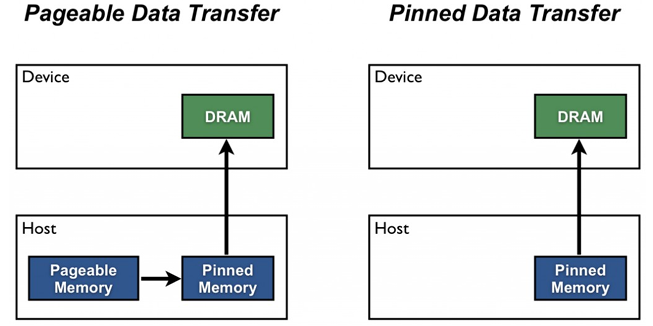
Figure 4: Page-Locked Host Transfer and Pinned Data transfer difference
5.5 Pipeline Parallelism Across Streams
By dividing input data into multiple chunks and assigning each chunk to a different stream, a pipelined execution model can be achieved. In such a model, each stream progresses through the stages of H2D transfer, kernel execution, and D2H transfer independently. As time progresses, different streams occupy different stages of the pipeline simultaneously.
This form of pipeline parallelism is particularly effective for streaming workloads such as video processing or real-time inference, where data arrives continuously and processing stages can be overlapped across frames. The overall latency per data unit is reduced, and steady-state throughput is significantly improved [3].
5.6 Synchronization and Stream Ordering
Although streams enable concurrency, explicit synchronization is often required to ensure correctness. CUDA provides synchronization mechanisms such as cudaStreamSynchronize() and cudaEventSynchronize() to coordinate execution across streams. Synchronization should be used judiciously, as excessive synchronization can serialize execution and negate the benefits of concurrency.
Operations within the same stream always maintain program order, while operations across different streams may execute in any order unless dependencies are explicitly enforced using events.
5.7 Limitations and Practical Considerations
While CUDA streams provide a powerful mechanism for concurrency, several practical limitations must be considered. Con- currency is constrained by available hardware resources, including the number of copy engines, the number of Streaming Mul- tiprocessors, and available memory bandwidth. Additionally, kernel characteristics such as register usage and shared memory consumption affect how many kernels can execute concurrently.
Moreover, concurrency does not automatically imply improved performance. Poorly chosen stream configurations, excessive kernel launch overhead, or imbalanced workloads can lead to resource contention and diminished returns. Profiling tools such as NVIDIA Nsight Systems are essential for verifying whether concurrency is actually achieved in practice.
5.8 Importance of Streams in Real-Time Systems
In real-time and low-latency systems, streams play a crucial role in meeting timing constraints. By overlapping data movement and computation, streams help reduce end-to-end latency and improve responsiveness. However, achieving predictable behavior requires careful design, as concurrency introduces variability due to dynamic scheduling and resource contention.
VI.PART-2: CREATION OF OBJECT DETECTION PIPELINES
6.1 Motivation
The primary motivation of this work is to understand and optimize the deployment of machine learning inference pipelines on edge devices from a hardware-software co-design perspective. While modern GPUs offer massive parallelism, realizing this potential in real-time systems requires careful structuring of software pipelines and explicit management of concurrency.
In many practical implementations, object detection pipelines are executed sequentially: frames are captured on the CPU, copied to the GPU, processed by a single inference kernel, and copied back for post-processing. Such designs under utilize available hardware resources and introduce unnecessary latency.
This project is motivated by three core questions:
- How can GPU concurrency be exploited to overlap pre-processing, inference, and data transfers?
- What trade-offs arise between latency, throughput, and accuracy in edge ML pipelines?
- How should CPU and GPU responsibilities be partitioned to maximize efficiency?
To answer these questions, multiple pipeline architectures are designed and tried [6, 7, 1].
6.2 TensorRT-Based Deployment on Edge Devices
To enable efficient inference on the embedded GPU, TensorRT is used to convert trained object detection models into opti- mized runtime engines. TensorRT performs graph-level and kernel-level optimizations during an offline engine-building phase, producing a device-specific binary representation known as a .plan file [8, 9].
This separation between model optimization and runtime execution is particularly important for edge devices. By generating
TensorRT engines offline, runtime overhead is minimized, memory allocation becomes predictable, and inference latency is reduced. Additionally, the use of reduced-precision formats such as FP16, INT8, INT16 (Supported by TensorRT) allows better utilization of GPU in Jetson Nano [8, 9].
From a system-design perspective, TensorRT enables inference to be treated as a modular GPU task that can be scheduled asynchronously. This makes it possible to overlap inference with other GPU operations such as pre-processing and rendering.
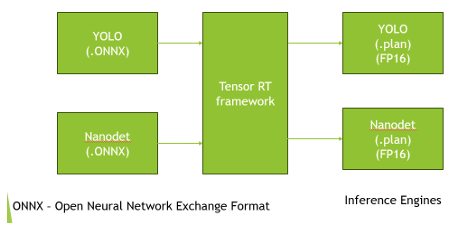
Figure 5: Conversion Process from ONNX to .plan files
6.3 Pipeline Decomposition and Scheduling Strategy
To systematically explore CPU–GPU interaction, the overall object detection pipeline is decomposed into three logical execution domains:
- GPU-Accelerated Preprocessing
- GPU-Accelerated Inference
- CPU-Based Control and Postprocessing
This decomposition allows each stage to be scheduled independently and mapped to the hardware component best suited for its computational characteristics. Compute-intensive, data-parallel tasks such as image preprocessing and inference are offloaded to the GPU, while control-heavy operations such as scheduling, synchronization, and fusion logic are retained on the CPU.
CUDA streams and events are used to explicitly manage dependencies between stages, allowing concurrency without sacrific- ing correctness. Slot-based buffering further enables multiple frames to progress through different pipeline stages simultaneously [10].
6.4 YOLO based object detection pipeline
The YOLO-only pipeline serves as the primary platform for exploring GPU concurrency and pipeline parallelism. By isolating pre-processing and inference into separate CUDA streams and introducing slot-based buffering, this design maximizes through- put while maintaining deterministic execution order.
In the pipeline, Three slots are running slots which capture frame, pre-process and does inference, all those things are done at GPU side, with timely kernel launches from CPU.Also the slot status (FSM updates) are done at CPU side. The post-processing is offloaded to CPU frame by frame, and the rest of the tasks, like Displaying in OpenGL, is carried out in GPU for real-timeness.
The timing numbers were pre-processing – 0.31 ms, inference – 15 ms and post-processing – 0.45 ms on average.
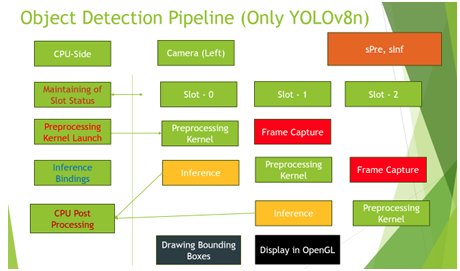
Figure 6: YOLO Pipeline
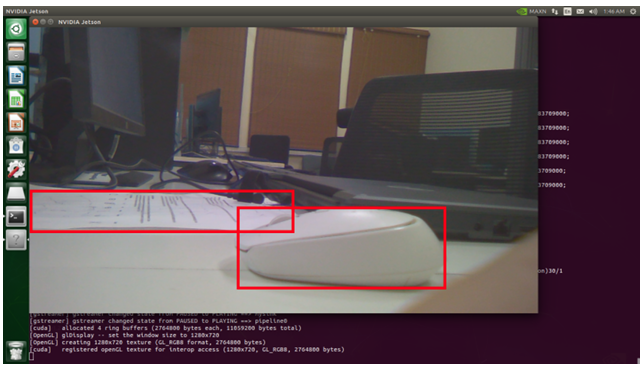
Figure 7: Object detection with YOLOv8n
6.5 NanoDet-m-plus Model Pipeline
While the YOLO pipeline focuses on throughput through concurrency, the NanoDet pipeline explores a different design objective: minimizing end-to-end latency. This pipeline prioritizes responsiveness over completeness by always processing the most recent frame, even at the cost of skipping intermediate frames [11].
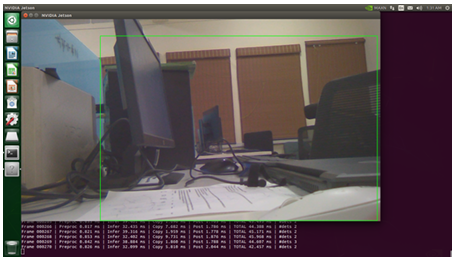
Figure 8: Object Detection using Nanodet-lite0 model
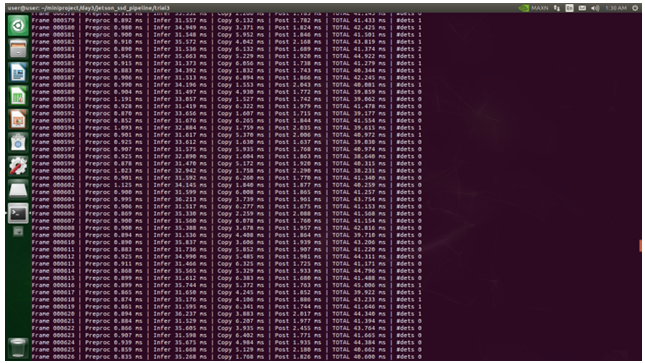
Figure 9: Time taken for each task in Nanodet-lite0 object detection pipeline
6.5.1 YOLO + NanoDet Ensemble Pipeline
The ensemble pipeline represents a constrained design space where latency optimizations such as frame skipping are no longer permissible. Since fusion requires both models to operate on the same input frame, strict synchronization and state management become necessary [1, 7].’OR’ type ensembling fusion technique is used in order to find the bounding boxes, it means if any one of the two models finds the object, then the object is predicted as found and corresponding bounding box is drawn in the screen.
Similar to YOLO pipeline, just two threads at CPU side for Post processing and managing tasks individually for both YOLO and Nanodet models, at GPU side two separate CUDA streams for both these models, with following the same Camera-buffering slots.
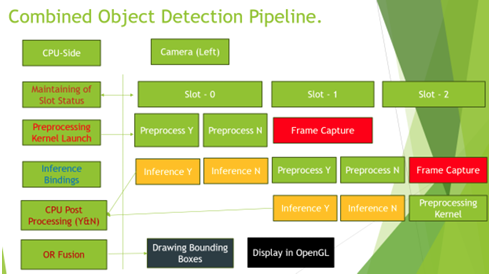
Figure 10: Block diagram depicting the runtime flow in ensemble model pipeline
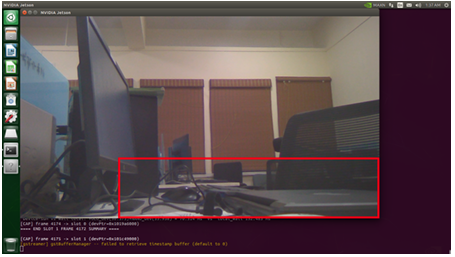
Figure 11: Object Detection using both models with ensembling
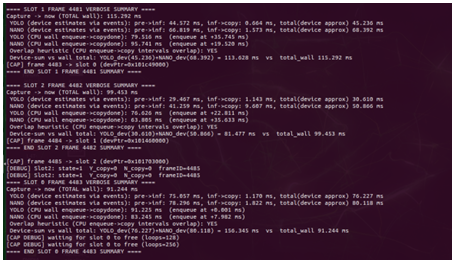
Figure 12: Time taken for each task in the pipeline
VII.PROFILING PROGRAMS USING NVIDIA NSIGHT SYSTEMS
Profiling is an essential step in understanding the runtime behavior of GPU-accelerated applications, particularly for real-time and low-latency systems. While functional correctness can be verified through program output, performance characteristics such as concurrency, overlap, and resource utilization can only be analyzed through detailed profiling.
In this project, NVIDIA Nsight Systems is used as the primary profiling tool to analyze CPU–GPU interaction, CUDA stream behavior, and pipeline execution overlap.
7.1 NVIDIA Nsight Systems Overview
NVIDIA Nsight Systems is a system-wide performance analysis tool designed to provide a timeline-based view of heterogeneous applications. Unlike kernel-level profilers that focus on individual GPU kernels, Nsight Systems captures interactions across the entire system, including CPU threads, CUDA runtime calls, GPU kernels, and memory transfers.
This makes Nsight Systems particularly suitable for profiling pipelined and asynchronous CUDA applications, where performance depends on how multiple components execute concurrently rather than on the execution time of a single kernel.
7.2 Profiling Workflow
Profiling is performed by launching the application under the Nsight Systems profiler using the command-line interface. Dur- ing execution, Nsight Systems records detailed timing information and stores it in a profiling report file with the extension nsys-rep.
nsys profile -o pipeline_profile ./application
The generated .nsys-rep file contains a complete execution trace of the application and can be opened using the Nsight Systems graphical interface for visualization and analysis [12].
7.3 Information Captured in the Profiling Report
The Nsight Systems report provides the following key insights:
- CPU thread execution timelines and scheduling
- CUDA kernel launch timing and execution
- Memory transfer operations, including Host-to-Device (H2D), Device-to-Host (D2H), and Device-to-Device (D2D)
- CUDA stream usage and
- Overlap between computation and data
- Synchronization points such as cudaStreamSynchronize and CUDA
This information is presented as a unified timeline, allowing direct observation of concurrency and pipeline overlap [12].
7.4 Profiling Asynchronous and Stream-Based Pipelines
For stream-based pipelines such as those implemented in this project, profiling focuses on verifying whether intended concurrency is actually achieved. In particular, Nsight Systems allows visualization of:
- Overlap between preprocessing kernels and inference
- Concurrent execution of inference and memory
- Pipeline fill and steady-state behavior across multiple
- Idle gaps caused by synchronization or resource
By examining these timelines, it is possible to identify whether operations are unintentionally serialized due to implicit synchronization, insufficient hardware resources, or incorrect stream usage [12].
7.5 Use of CUDA Events for Fine-Grained Measurement
In addition to system-level profiling, CUDA events are used within the application to measure stage-level latency. Events are recorded at the start and end of preprocessing and inference stages, enabling precise measurement of kernel execution time and inter-stage dependencies.
While CUDA events provide localized timing information, Nsight Systems complements this by revealing how these stages interact globally across CPU and GPU execution.
7.6 Relevance to Real-Time System Design
For real-time object detection pipelines, profiling is not only a performance optimization step but also a validation tool. Nsight Systems enables verification that the pipeline maintains continuous execution without stalls and that the GPU remains effectively utilized.
The insights obtained through profiling guide design decisions such as stream allocation, buffer sizing, and task partitioning between CPU and GPU. This makes profiling an integral part of hardware–software co-design for edge-based machine learning systems.
VIII.KEY EXPLORATION OUTCOMES
Through the implementation of multiple pipeline architectures, this project demonstrates that efficient edge ML deployment is fundamentally a systems problem. GPU acceleration alone is insufficient without careful scheduling, buffering, and synchronization.
The experiments reveal that:
- CUDA streams are getting serialized due to the hardware constraints(Only 1 SM in Jetson Nano). That is the reason for the Latency addup.
- Latency-optimized designs and throughput-optimized designs require fundamentally different scheduling
- Multi-model systems introduce synchronization constraints along with hardware constraints that dominate system design decisions
- These program execution flow have been tried to profile through the NVIDIA Nsight Viewer tool, but unsuccessful to profile the GPU events correctly. (It was due to some flags not been set correctly during the generation of the event
These insights highlight the importance of hardware-aware software design for real-time embedded machine learning systems.
REFERENCES
- Heras et al. Ensemble methods in machine learning. University of La Rioja Technical Report, 2012.
- NVIDIA CUDA C Programming Guide, 2018. Version 9.1.
- Lei Cuda streams explained, 2020.
- NVIDIA Developer How to overlap data transfers in cuda c/c++, 2017.
- NVIDIA Developer How to optimize data transfers in cuda c/c++, 2017.
- NVIDIA Developer Zero copy in action using an end-to-end ml pipeline, 2020.
- Inspired Object detection through ensemble of models, 2021.
- NVIDIA TensorRT Developer Guide, 2023.
- Abhay Understanding nvidiaaˆs tensorrt for deep learning model optimization, 2023.
- Mobile What is triple buffering?, 2022.
- Opencv zoo models: Nanodet, 2022.
- NVIDIA NVIDIA Nsight Systems User Guide, 2023.
Recent Comments